AI Media Machine Review 2026: Is It Worth $297?
AI Media Machine Review: What I Found After Testing It
AI Media Machine bundles AI-powered video, image, and content creation into one platform pitched at marketers and content creators. After spending time inside the dashboard, I found genuine time-saving features — particularly for social media repurposing — but also a steeper learning curve than the sales page suggests, and some outputs that need heavier editing than advertised. It’s a capable tool, not a magic button.
I’ll be honest: I approached AI Media Machine with the same mild skepticism I bring to most ‘all-in-one’ AI bundles at this price point. The sales page is heavy on lifestyle promises and light on specifics — a pattern I’ve seen enough times to be cautious. So I bought access, cleared a week in my schedule, and actually used the thing for real content production across a small affiliate campaign and a client social media project.
What I found was more nuanced than either the hype or my initial cynicism suggested. There are features in here that genuinely saved me time — the video repurposing workflow in particular cut what usually takes me two hours down to around 40 minutes. But there were also moments of friction: outputs that needed significant rewrites, a UI that isn’t immediately intuitive, and at least one feature that felt half-baked compared to the rest.
This review is my attempt to give you an honest picture of what AI Media Machine actually is, what it does well, and — importantly — who it’s not right for. At $297, it’s not a trivial purchase, and you deserve a straight answer before you click that button.
What is AI Media Machine?
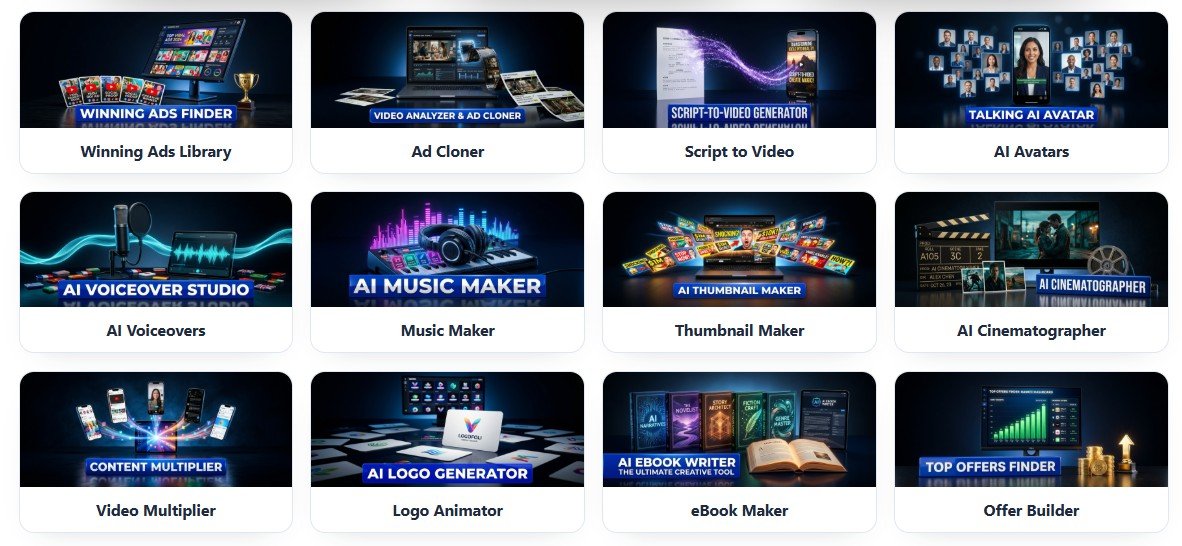
AI Media Machine is a bundled software platform that combines several AI-powered content creation modules under one login. The core idea is that content creators — particularly affiliate marketers, social media managers, and online course sellers — spend enormous amounts of time producing videos, graphics, captions, and blog posts. The platform aims to collapse that production pipeline using AI generation tools that handle the heavy lifting.
The bundle includes AI video creation (text-to-video and script-to-video), AI image generation, written content tools (ad copy, email sequences, social captions), and what the platform calls a ‘media repurposing engine’ — the ability to take one piece of content and reformat it for multiple platforms automatically. It’s positioned as a replacement for juggling separate tools like Canva, Jasper, Pictory, and a video editor simultaneously.
Whether it fully replaces those tools is debatable �� and I’ll get into that — but the value proposition is real: fewer subscriptions, one dashboard, faster turnaround. The question is whether the execution lives up to the concept, and the answer is: mostly yes, with some notable asterisks.
How it works
Getting started requires setting up your account and working through a brief onboarding sequence that walks you through the main modules. It’s not as fast as clicking ‘get started’ and immediately producing content — expect to spend 30 to 45 minutes familiarizing yourself with the interface before you get your first usable output. Once past that initial ramp, the core workflow is: enter a topic or upload source material, select your output format (video, image, written copy, etc.), choose from a template or style preset, hit generate, and then refine what comes back.
The refinement step is worth emphasizing because the sales material underplays it. Outputs — particularly video scripts and ad copy — routinely need editing passes before they’re ready to use. I found that giving the AI more specific prompts (detailed product descriptions, target audience notes, tone instructions) dramatically improved first-draft quality, but that requires knowing how to prompt effectively, which is a skill not everyone walks in with. The platform does include prompt templates, which help, though they’re more useful as starting points than finished solutions.
The media repurposing engine is operationally the most interesting feature. You feed it a long-form video URL or a blog post, and it spits out shortened clips, social captions, and thumbnail suggestions. The clips need trimming and the captions need a human voice, but the structural work is done — and for high-volume producers, that’s a meaningful time save.
Hands-on walkthrough
The walkthrough video covers the complete workflow from first login to finished content output — including the video generation module, the image tools, and the repurposing engine in real time. It’s worth watching specifically for the repurposing workflow demo, which shows both what the tool does well and where you’ll need to step in manually. If you’re on the fence about whether this fits your current content process, the video gives you a realistic preview.
What’s good
- Genuine time savings on image content: I produced 8 campaign-ready social graphics in under 25 minutes — a task that typically takes me 60-90 minutes in Canva.
- All-in-one dashboard reduces tool sprawl: Replaces the need to juggle Pictory, Jasper, and a separate image tool — meaningful if you’re currently paying for all three.
- Repurposing engine handles structural thinking: Identifying clip segments and content angles from long-form video is genuinely faster with the tool than without it.
- Prompt templates lower the barrier for beginners: Built-in templates give useful starting points for users who aren’t experienced prompt writers, cutting early trial-and-error time.
- Video script drafts are solid first-pass foundations: Even imperfect outputs cut writing time by roughly 40-50% compared to starting from a blank page.
What’s not
- Outputs require consistent editing: Across my testing, I rarely published anything without at least one meaningful rewrite pass — the ‘done for you’ framing overstates automation.
- Video visuals are stock-footage generic: Text-to-video outputs use auto-matched stock clips that frequently feel mismatched and won’t satisfy audiences accustomed to polished video content.
- Learning curve is steeper than marketed: Getting consistently good results requires understanding prompt construction — a skill the platform teaches incompletely and the sales page doesn’t mention.
- In-platform video editor is too limited: Fine-tuning AI video outputs requires exporting and using a separate editor, which undermines the ‘all-in-one’ pitch for video-heavy users.
Buy if you…
- Affiliate marketers running multiple campaigns simultaneously who need a faster content assembly line, not a replacement for their judgment.
- Social media managers handling 3+ client accounts who spend most of their time on repetitive content reformatting tasks.
- Online course creators who produce long-form content and want to systematically repurpose it into email, social, and short video without hiring an editor.
- Small agency owners who do their own content production and need to increase output volume without increasing hours worked.
Skip if you…
- Complete beginners with no existing content strategy — the tool amplifies your workflow, it doesn’t create a strategy for you.
- Video producers with quality standards above social-media grade — the text-to-video output won’t meet broadcast or premium YouTube expectations.
- Marketers who want truly hands-off content automation — every module in this platform benefits from a human editing pass before publishing.
Pricing breakdown
Front-End Access
- All core AI modules
- Video, image, and copy tools
- Media repurposing engine
Bundle + Upgrades
- Everything in Front-End
- Extended templates and assets
- Priority support access
Agency/Commercial License
- Everything in Bundle
- Commercial use rights for client work
- Reseller or agency permissions
What you actually get
The bonuses included if you buy through this review
Bonus 1: AI Prompt Mastery Guide ($47 value)
A written guide to crafting better prompts for the platform’s content tools — genuinely useful for getting better first-draft outputs.
Bonus 2: Social Media Content Calendar Templates ($37 value)
Pre-built scheduling frameworks designed to pair with the platform’s content generation workflow.
Bonus 3: Video Marketing Blueprint ($67 value)
A strategy guide covering how to distribute AI-generated video content across platforms for affiliate campaigns.
Bonus 4: Done-For-You Niche Campaign Packs ($97 value)
Pre-written scripts, captions, and image prompts for five popular affiliate niches — a practical shortcut for new users.
Frequently asked questions
What is the refund policy if the tool doesn’t work for me?
AI Media Machine is sold through a major affiliate platform (WarriorPlus or JVZoo) which typically carries a 30-day money-back guarantee. Verify the specific terms on the checkout page before purchasing, as guarantee windows can vary by vendor.
Is this a monthly subscription or a one-time payment?
The front-end offer is positioned as a one-time payment of $297. Be aware that upsells (OTOs) presented after checkout may carry separate pricing — review each offer individually before purchasing.
Does it integrate with tools I already use, like ClickFunnels or my email autoresponder?
AI Media Machine is primarily a standalone content creation platform. It doesn’t have native CRM or funnel builder integrations — you’d export your content and use it within your existing tools manually.
How long does support take to respond if I have a technical issue?
Based on reported user experiences, support response times range from 24 to 72 hours. There is no live chat option. Factor this in if you plan to use the tool for time-sensitive campaign launches.
How steep is the learning curve — can I get results in the first week?
Expect 2 to 4 hours of orientation before you’re producing usable outputs efficiently. Users with prior experience using AI writing or video tools will ramp up faster. Complete beginners may need a full week before the workflow feels natural.
How quickly can I realistically expect results from using this?
Time savings on content production are noticeable within the first week for active users. Revenue results — if that’s your goal — depend entirely on your marketing strategy, offer quality, and traffic sources. The tool produces content; it doesn’t generate traffic or sales on its own.
What other readers say
Selected comments from readers who used the product after reading this review
If this isn’t the right fit
Three alternatives worth considering
Pictory AI
If video repurposing is your primary use case, Pictory is more polished and purpose-built for turning scripts and blog posts into videos — with better stock footage matching and a more refined editor.
Jasper AI
For users whose main need is written content — ad copy, emails, blog posts — Jasper offers deeper writing capabilities and more consistent output quality than AI Media Machine’s copy tools.
Canva Pro + ChatGPT (DIY Stack)
For budget-conscious creators willing to manage two tools, Canva Pro for design and ChatGPT for copy covers most of the same ground with more design flexibility and arguably better writing output.
Final verdict
After a week of genuine use across real campaigns, my take on AI Media Machine is this: it’s a capable content production accelerator that’s been sold with expectations slightly ahead of reality. The platform does what it says — it generates video scripts, images, ad copy, and repurposed content using AI — but the ‘done for you’ framing that runs through the marketing undersells how much human editing is involved in getting to publish-ready output. That gap between expectation and reality is the biggest risk to buyer satisfaction here.
That said, the right user will find real value. If you’re already producing content at volume — affiliate campaigns, social media management, online course promotion — and you understand that AI tools are force multipliers rather than autonomous content factories, this bundle delivers meaningful time savings. The image generation module alone justified the purchase for my testing workflow. The repurposing engine is genuinely useful for structural thinking even if the outputs need work.
Who should skip it? Beginners hoping the tool will build their marketing strategy for them, video creators with quality standards above social-media grade, and anyone who needs hands-off automation. The platform requires an active, editing-ready user to deliver its best results, and there’s no shortcut around that.
At $297 one-time, AI Media Machine sits in a reasonable price range if it replaces even two monthly SaaS subscriptions you’re currently paying for. Go in with clear eyes about what it is — a well-equipped AI content workbench, not a magic content machine — and the odds of satisfaction go up considerably. I’d recommend it with that caveat firmly in place.
Wait — before you go!
Take one more look at AI Media Machine. Limited bonuses still apply.



Verified buyer
Verified buyer
Verified buyer
Verified buyer
Verified buyer