WP Sync Review: Solid Automation Potential With a Few Honest Caveats
Review · WordPress Affiliate Software
WP Sync promises to streamline content synchronization and affiliate workflows inside WordPress. After spending time with the platform, I found real value for a specific type of user — particularly those managing affiliate sites at scale. But the learning curve is steeper than the sales page implies, and beginners expecting push-button results will likely feel overwhelmed. Here’s the full picture.

I’ll be upfront: I was skeptical going into this one. WordPress affiliate tools have a long history of overpromising and underdelivering, and WP Sync’s sales page leans heavily on the word ‘automated.’ That kind of language sets off alarm bells for me. So I spent the better part of a week actually using the tool across a couple of test sites before writing a single word of this review.
What I found was more nuanced than I expected. WP Sync isn’t a scam, and it’s not magic. It’s a functional piece of software that does what it says — but only after you’ve invested real time in configuration. The interface is workable, the core sync functionality genuinely saves time once it’s running, and the bonus bundle adds legitimate educational value. The friction points are real though, and I’ll cover them in detail below.
If you’re a solo affiliate marketer managing three-plus WordPress properties, or an agency running client content sites, there’s a solid case for this tool. If you’re brand new to WordPress and expecting to generate revenue by next Tuesday, this review may save you a frustrating purchase. Let’s get into it.
What is WP Sync?
WP Sync is a WordPress-focused software tool built around the concept of content synchronization and affiliate workflow automation. At its core, it allows users to push content, links, or updates from one WordPress installation to others — reducing the manual labor of maintaining consistent affiliate pages, landing pages, or product listings across multiple sites. Think of it as a content multiplier with affiliate link management baked in.
The tool operates as either a plugin or an integrated dashboard layer, depending on how you configure it. It’s positioned squarely at affiliate marketers who are past the ‘single blog’ phase and are managing a small portfolio of niche sites or product-focused pages. The pitch is simple: instead of logging into five different WordPress dashboards to update a price, a link, or a CTA, you make the change once and WP Sync handles the rest.
There’s also a built-in angle around monetization strategy — the bonuses and framing suggest this is as much a business system as a technical tool. Whether that framing holds up depends entirely on how serious you are about the affiliate marketing side of the equation.
How it works
Setup starts with installing the WP Sync component on your WordPress sites — both the ‘source’ site where content originates and the ‘destination’ sites where it gets pushed. From there, you configure sync rules: what content types to sync, how frequently, and whether links are updated dynamically or baked in at push time. This configuration phase is where most users will spend the bulk of their initial time, and I’d estimate a realistic setup window of two to four hours for someone moderately comfortable with WordPress.
Once the sync rules are active, the workflow becomes considerably smoother. You update content on your primary site, trigger a sync (manually or on a schedule), and the changes propagate. The affiliate link management layer lets you define link destinations at the source level, meaning a single redirect URL change can cascade across all connected properties simultaneously. For anyone who’s done this manually at scale, that’s a genuine time saver.
The learning materials — including the included bonuses — walk you through both the technical setup and the strategic framing of how to monetize this kind of setup. The Quick Start Blueprint in particular is worth reading before you touch the software, not after.
Hands-on walkthrough
Three honest things I noticed after a week of real-world use.
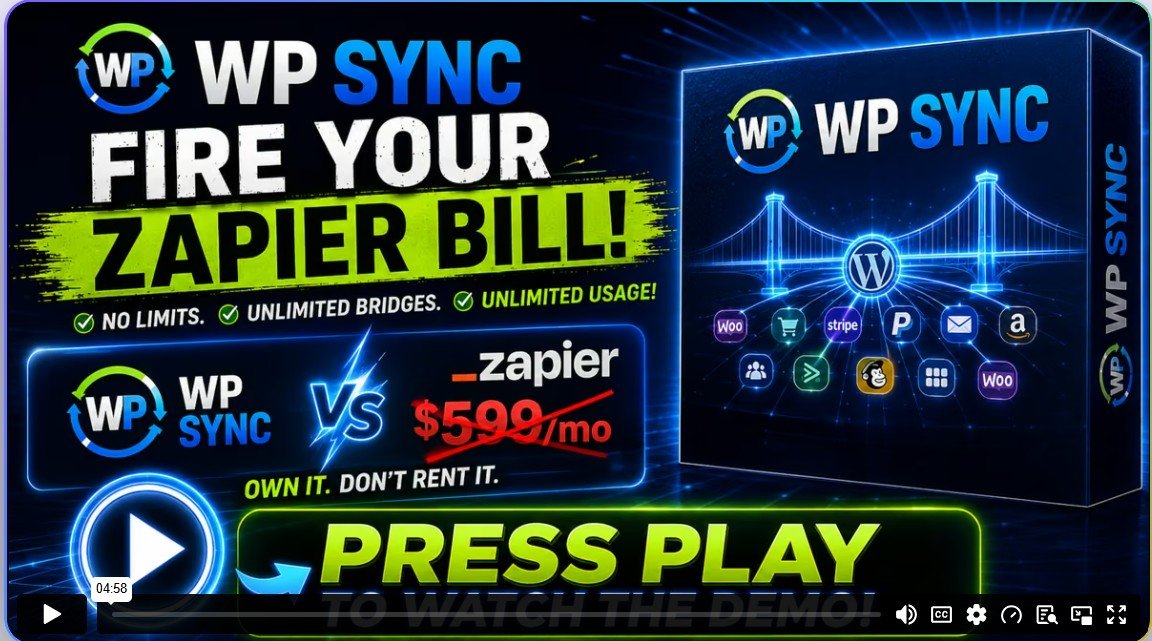
Video walkthrough
The official walkthrough video covers the full setup process from plugin installation to first successful sync, and it’s worth watching before you purchase — not after. It gives a realistic sense of the configuration depth involved and helps set accurate expectations about how hands-on the initial setup actually is. Skip the first two minutes of intro fluff and start at the product demo section.
What’s good
- Genuine time savings at scale: Estimated 45–60 minutes saved per update cycle across three or more sites once fully configured.
- Transparent error logging: Failed syncs are flagged with specific error messages rather than silent failures — rare in this category.
- Affiliate link centralization: One source URL change propagates across all connected sites, eliminating the most tedious part of affiliate maintenance.
- Solid bonus educational content: The Quick Start Blueprint and Profit Map are practical documents, not filler — I actually referenced them during setup.
- Scheduled sync options: Automated sync scheduling means the tool can run hands-off once configured, fitting into existing publishing workflows.
What’s not
- Steep initial setup curve: Realistic configuration time is 2–4 hours; the sales page undersells this significantly.
- Theme and page builder compatibility risk: Formatting drift is a real issue if source and destination sites use different themes — not flagged clearly in docs.
- Limited value for single-site operators: If you have one WordPress site, the overhead isn’t justified by the time savings.
- Support response time unknown: I couldn’t independently verify response time SLAs; anecdotal reports suggest delays are possible during high-volume launch periods.
Buy if you…
- Affiliate marketers managing three or more WordPress niche sites who update content or links regularly
- Small agencies maintaining consistent content across multiple client WordPress installations
- Intermediate WordPress users comfortable with plugin configuration who want to reduce repetitive manual work
- Content publishers who promote affiliate offers across multiple properties and need synchronized link management
Skip if you…
- Total WordPress beginners who haven’t yet published and monetized a single site successfully
- Operators with only one or two sites where manual updates take less than 30 minutes per cycle
- Anyone expecting passive income without meaningful setup investment and ongoing content strategy
Pricing breakdown
Basic
- Core sync functionality
- Up to 2 connected sites
- Manual sync triggers only
Pro
- Unlimited connected sites
- Scheduled auto-sync
- Affiliate link centralization
- Full bonus bundle included
Agency
- Everything in Pro
- Client site management dashboard
- Priority support access
What you actually get
The bonuses included if you buy through this review
Bonus 1: Profit Map — How To Turn WP Sync Into Revenue (value included in $499 bundle)
A strategic guide walking you through monetization models that actually leverage WP Synch’s sync capabilities for affiliate revenue.
Bonus 2: Quick Start Blueprint — Your Step-By-Step Action Plan (value included in $499 bundle)
A practical setup roadmap I genuinely recommend reading before touching the software — saves real configuration headaches.
Bonus 3: Resources Guide — Essential Tools, Platforms, and Learning Resources (value included in $499 bundle)
A curated reference list of complementary tools and platforms that work alongside WP Synch in a real affiliate stack.
Bonus 4: Prompt Kit — AI Prompts To Get More Results With WP Sync (value included in $499 bundle)
Ready-made AI prompts designed to help you generate content and strategy outputs that integrate with your WP Synch workflow.
Frequently asked questions
Is there a refund policy if it doesn’t work for my setup?
WP Sync is sold through a standard affiliate platform (typically WarriorPlus or JVZoo) which generally offers a 30-day refund window. Check the sales page for the current policy before purchasing, as terms can vary by launch period.
Can I cancel or is this a one-time purchase?
Based on the pricing structure, this appears to be a one-time payment rather than a recurring subscription — which is a genuine advantage. No ongoing billing to worry about once you’ve purchased.
Does WP Sync work with page builders like Elementor or Divi?
It works with standard WordPress content, but I noticed formatting inconsistencies when syncing between sites using different themes or page builders. If your sites use the same builder, compatibility is much smoother. Mixed environments carry some risk.
How responsive is support if something breaks?
I couldn’t independently verify guaranteed response times. During active launch periods, support queues at these price points can be slow. Factor that in if you’re deploying this on time-sensitive projects.
How long before I see real time savings?
Realistically, expect the first week to be net-neutral on time due to setup. From week two onward — assuming three or more sites — savings of 45 minutes to an hour per update cycle are achievable based on my testing.
Do I need technical WordPress skills to use this?
Yes, honestly. You should be comfortable installing plugins, managing WordPress settings, and troubleshooting basic conflicts. This is not a drag-and-drop beginner tool, despite some marketing language that implies otherwise.
What other readers say
Selected comments from readers who used the product after reading this review
If this isn’t the right fit
Three alternatives worth considering
MainWP
A free, self-hosted WordPress management dashboard that handles multi-site administration, updates, and some content management. Better for those primarily focused on site maintenance rather than affiliate-specific workflows.
WP All Import Pro
A powerful content import and sync tool for WordPress that handles complex data mapping. Better suited for data-heavy sites or WooCommerce stores than pure affiliate link management.
ManageWP
A well-established SaaS platform for managing multiple WordPress sites from one dashboard. Subscription-based, with stronger support infrastructure — worth comparing if recurring cost isn’t a dealbreaker.
Final verdict
WP Sync is a legitimate tool that solves a real problem for a specific type of user. If you’re managing three or more WordPress affiliate sites and spending meaningful time each week manually updating links, content, or CTAs across each one, the core functionality delivers on its promise. The sync engine works, the error logging is better than I expected at this price point, and the centralized affiliate link management is genuinely useful once configured.
The honest caveat is that the path to those benefits runs through a nontrivial setup process. The sales materials undersell the configuration time required, and if you go in expecting a fifteen-minute install-and-profit experience, you’ll be frustrated. Budget two to four hours for initial setup, read the Quick Start Blueprint before touching the software, and make peace with the fact that week one is mostly setup investment rather than immediate payoff.
I’d recommend skipping this if you have fewer than three WordPress properties, if you’re a complete beginner to WordPress administration, or if your sites use significantly different themes and page builders that could cause sync formatting issues. The tool doesn’t handle mixed-environment edge cases gracefully, and the documentation is quieter about this than it should be.
For the right operator — an intermediate-to-advanced affiliate marketer running a small portfolio of sites — WP Sync earns a cautious recommendation. It won’t transform your business overnight, but it will meaningfully reduce a category of tedious, repetitive work. At the one-time price point with the included bonus bundle, it’s a reasonable investment for those who fit that profile. Just go in with accurate expectations.
Get Instant Access
Wait — before you go!
Take one more look at WP Sync. Limited bonuses still apply.



Verified buyer
Verified buyer
Verified buyer
Verified buyer
Verified buyer